
Overview
With one toggle, Webgility Desktop brings each Shopify gift-card payment onto the order as its own line item. From there a single posting-time prompt maps the line to a QuickBooks item, and that item carries every future gift-card sale and redemption to your liability account.
When This AppliesUse these steps when your Shopify store sells or accepts gift cards and you want Webgility Desktop to post them into QuickBooks without hand-edits.
What You Will NeedIn QuickBooks Desktop, create a Gift Card Liability account as Other Current Liability, and a service or non-inventory item named Gift Card that posts to that liability account. You may also refer to How to Connect Shopify to Webgility Desktop if your Shopify store is not connected yet.
Steps to Map Shopify Gift Cards
Step 1: In Webgility Desktop, select your Shopify store from the sales-channel selector in the top-right corner, then go to Connections > Sales Channels > Settings.
Step 2: On the Sales Channel Settings dialog, stay on the Download Settings tab, scroll to Download Options, enable Gift card payment as a line item, and click Save & Continue.
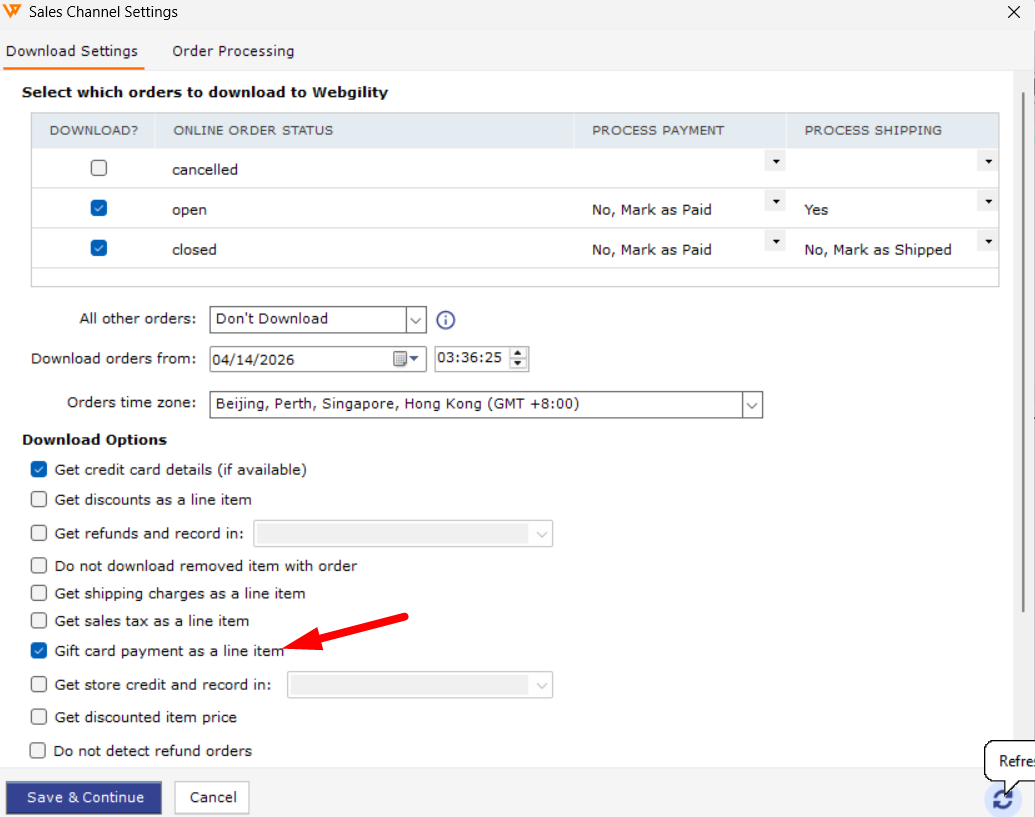
Step 3: If past Shopify orders need the new shape too, unsync and redownload them (see How to Unpost Transactions from Webgility Desktop with Undo Sync). Otherwise only new downloads carry the gift-card line and old orders stay as they were.
Step 4: When the next Shopify order with a gift-card payment downloads, the item-mapping prompt opens for the gift-card line — map it to the Gift Card item you set up in QuickBooks (see How to Map Products While Posting Orders).
Step 5: Post the order and open the transaction in QuickBooks Desktop to confirm the gift-card line routes to the Gift Card Liability account.
Important Note: "Enabling the line-item toggle and mapping the gift-card payment method are two different paths. Pick one. With the toggle on, every gift-card payment arrives as a line item and is mapped at the item level — no payment-method mapping needed. With the toggle off, map the gift-card payment method to a liability account instead. Mixing the two double-counts the balance."
Keep a single Gift Card item linked to a single Gift Card Liability account. Sales add to the liability; redemptions drain it. The account balance then tells you what you still owe in outstanding gift-card credit.
Additional SupportIf the gift-card line still posts to the default product after these steps, email support@webgility.com. Include the Shopify order number and the Gift Card item and liability account names you set up in QuickBooks.