
Reauthorization is part of the normal BigCommerce connection flow.
When This AppliesUse these steps if your BigCommerce store has connected to Webgility Online before, you are reauthorizing it, and the Time Zone field on the Enter Details screen looks locked on UTC timezone so you cannot pick another value.
Why This HappensThe Time Zone field on the Enter Details screen is locked after a store connects for the first time, so reauthorizations reuse the timezone that was set on the original connection. The dropdown is meant to be read-only at this step, not blocked by an error.
Important Note: "The locked Time Zone field does not stop reauthorization. Click Next to continue, and update the timezone separately after the store is reconnected."
Steps to Reauthorize the Store
Step 1: Start the reauthorization from Connections and click Reauthorize next to your BigCommerce store card, following the same flow described in How to update Sales Channel credentials in Webgility Online.
Step 2: On the Enter Details screen, leave the Time Zone dropdown as it appears and click Next to continue.
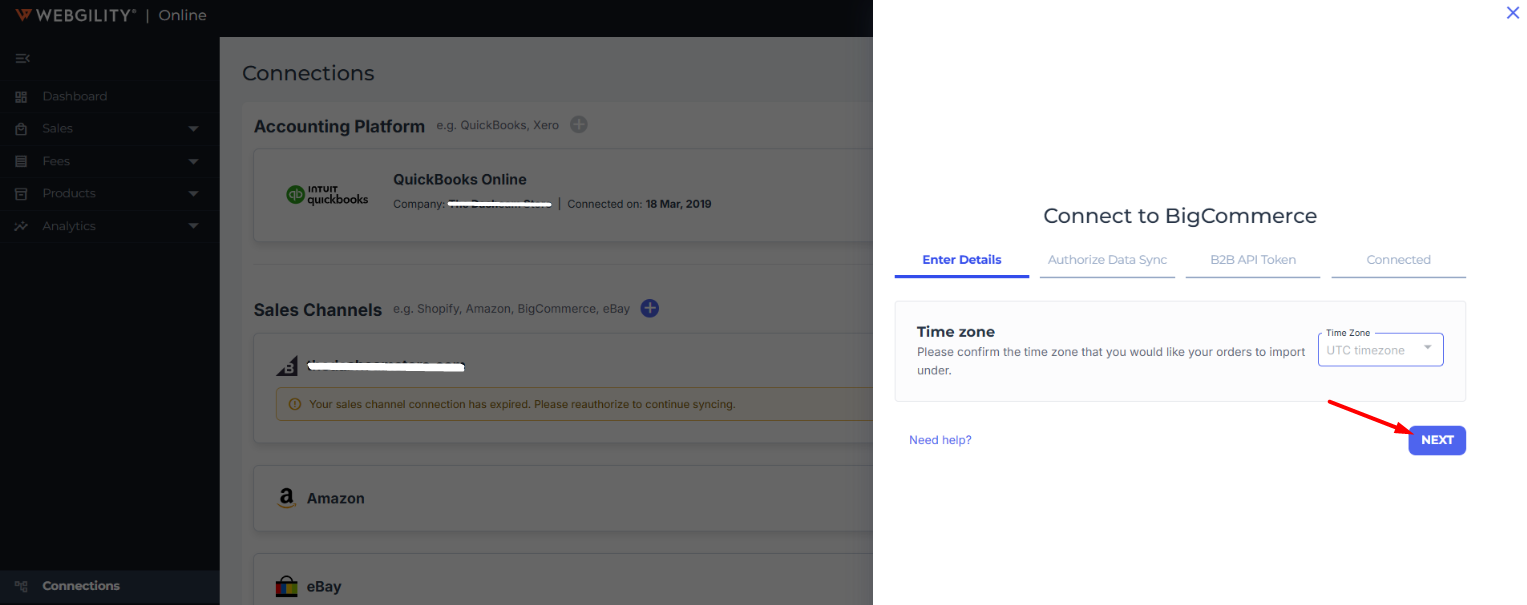
Step 3: Sign in to BigCommerce, approve the Webgility app when prompted, and let the browser return you to Webgility Online — the connection is now reauthorized.
Step 4: If UTC timezone is not correct for your store, go to Connections, find your BigCommerce store card, click Preferences (next to Reauthorize), update the Timezone field, and click Save. The path is the same one described in Sales Channel Preferences.
Set the correct timezone from Preferences right after reauthorizing so future order downloads and reports use your store's local time.
Additional SupportIf the reauthorization still does not complete after the timezone dropdown is left as-is, contact Webgility Support with your BigCommerce store URL and a screenshot of the Enter Details screen so the team can investigate.