
Problem Description
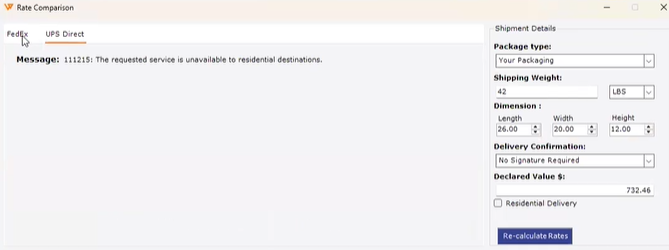
"You are rating a UPS Direct shipment inside Webgility Desktop and the Rate Comparison dialog returns: Message: 111215: The requested service is unavailable to residential destinations. FedEx returns rates for the same shipment, but UPS Direct does not."
Root Cause
UPS classifies the destination as residential from the address itself (postal code), independent of the Residential Delivery checkbox in Webgility Desktop. When UPS has classified the destination as residential, certain combinations of UPS service and Delivery Confirmation value are not accepted and UPS returns error 111215. The fix lives in the Delivery Confirmation field on the shipment, not in the Residential Delivery checkbox and not on the UPS account.
Solution Steps
Step 1: In the Rate Comparison dialog, open the UPS Direct tab where the 111215 error appeared.
Step 2: In the Shipment Details panel on the right, open the Delivery Confirmation dropdown and select OFF.
Step 3: Click Re-calculate Rates. The UPS services (UPS Next Day Air, UPS Next Day Air Early A.M., UPS 2nd Day Air, UPS 3 Day Select, UPS Ground) should now return rates alongside the Standard and My Rates columns.
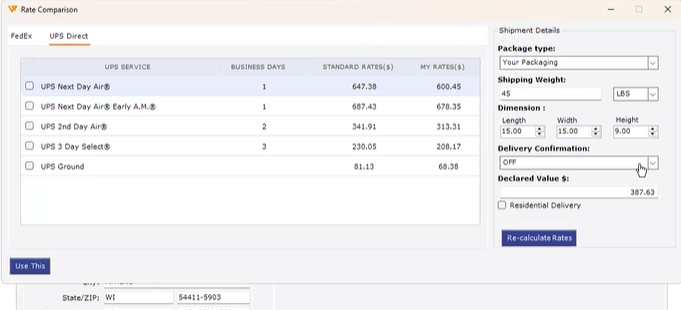
Step 4: Select the UPS service you want to use and click Use This to apply the rate to the shipment, then generate the label as usual.
Step 5: If you ship to residential addresses often and want to avoid this error on every shipment, change the default for UPS Direct: go to Shipping > Shipping Settings, scroll to Default settings for each processor, and click Configure next to UPS to set Delivery Confirmation to OFF as the default (see How to Configure Default Shipping Settings for the full walk-through of each default field). That way the Rate Comparison dialog opens with the accepted value already selected.
Important Note
Note: If your UPS connection is on the older authentication, Delivery Confirmation requests can fail even with Delivery Confirmation set to OFF. Confirm your UPS connection is on OAuth by following Upgrade UPS Connection in Webgility Desktop to Comply with OAuth before you retry.
Key Recommendation
When UPS returns error 111215, start with Delivery Confirmation. The Residential Delivery checkbox in Webgility Desktop does not override UPS's own classification of the destination, so unchecking it does not clear the error. If you need signature tracking on a specific residential shipment, pick a UPS service that supports signature on residential destinations before you set Delivery Confirmation back on. Having more than one UPS account configured in Webgility Desktop is fine — the fix lives on the shipment, not on the account.
Further Assistance
If UPS Direct still returns error 111215 after you set Delivery Confirmation to OFF and re-calculate rates, contact Support with the order number, the destination ZIP, the UPS service you selected, and the exact text that appears after "Message:" in the Rate Comparison dialog so we can trace it through UPS's API logs.