
When This Applies
You click Post To QuickBooks on an Amazon settlement in Webgility Desktop and the Reconciling window stops at Error in Post Refunds. The error window names one order and shows the message: "Returned Items ... are not yet received in settlement report. Please download the latest settlement report and try again." Posting the same settlement again gives the same error.
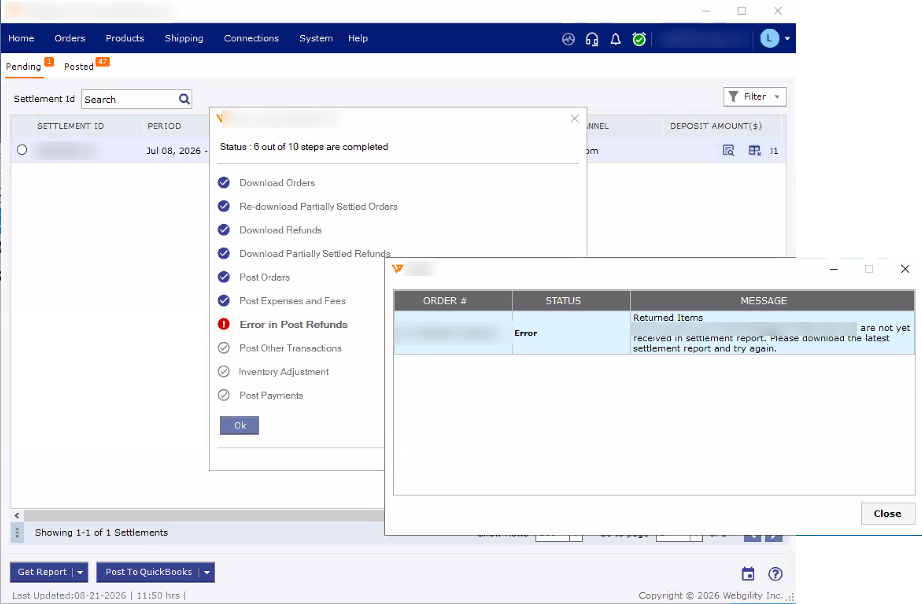 The settlement stops at Post Refunds and the error window names the order with the returned item.
Webgility downloads a refund from Amazon as soon as the return is recorded on the order. Amazon, however, adds each returned item to a settlement report only once it processes that item, and that can happen in a later settlement. When a customer returns more than one item and only some of them are in the current settlement, Webgility cannot match the full refund to this report, so posting stops at the refund step.
Steps to Post the Settlement
Step 1: In the error window, note the order number shown under Order #, then click Close. The settlement screens are shown in Download and Post Amazon Settlement Reports with Webgility Desktop.
Step 2: Click Get Report to download the latest settlement reports, then click Post To QuickBooks again. If Amazon has already processed the returned item, the settlement now posts.
Step 3: If the error remains, open that order under the Posted or New orders tab, and go to the Returns tab. Select only the returned items that show Yes under Settlement Received, then click Post To QuickBooks. Leave the items that show No unselected for now.
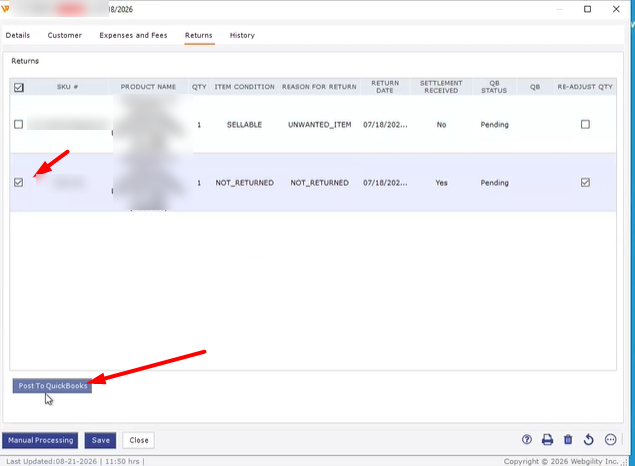 Select only the item with Settlement Received set to Yes, then click Post To QuickBooks.
Step 4: Go back to the settlement on the Pending tab and click Post To QuickBooks. The Reconciling window now completes every step.
Step 5: When a later settlement includes the remaining item, it shows Yes under Settlement Received on the order's Returns tab. Post it the same way, then post the new settlement.
Additional Support
If the refund does not appear in Webgility at all, follow How to Resolve Missing Refund Orders in Amazon Settlement Reports first. If the settlement still stops at Post Refunds, share the settlement period, the order number from the error window, and a screenshot of the error with Webgility Support.