
Part of How to Configure Your Channel Settings in Webgility i.
Sales tax tab
This tab sets whether and how Webgility i records the tax on each order. The settings shown depend on the country of your QuickBooks Online company.
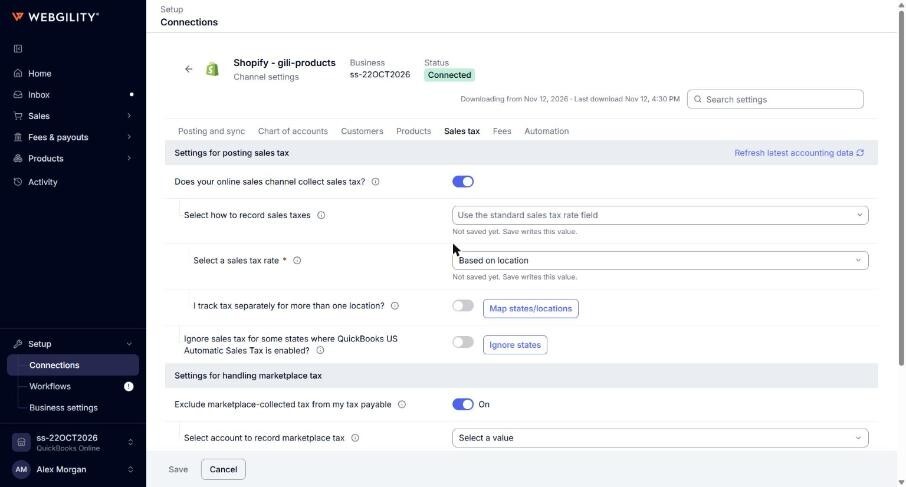
Settings for posting sales tax
- Does your online sales channel collect sales tax?: turns on recording sales tax. Options: on or off.
- Select how to record sales taxes: United States, Canada and United Kingdom companies. Options: Record the exact amount collected as a line item, Use the standard sales tax rate field. In other countries, you pick the tax code to use.
- Use this line item to record tax in QuickBooks: shows with Record the exact amount collected as a line item. The QuickBooks Online item that records the tax.
- Select a sales tax rate: shows with Use the standard sales tax rate field. For United States companies, Based on location is also an option.
- All the order amounts are: Canada, United Kingdom and Australia companies. Options: Exclusive of tax, Inclusive of tax.
- Ignore sales tax for some states where QuickBooks US Automatic Sales Tax is enabled? and Ignore certain states for tax sync: leaves the tax of the states you pick out of what posts, for companies that use QuickBooks Online Automated Sales Tax. Options: on or off.
- I track tax separately for more than one location? and Map states/locations: United States and Canada companies, on plans that include it. Maps each state, city, county or zip code to a sales tax code. A zip code row wins over a city, and a city over a state.
Settings for handling marketplace tax
- Exclude marketplace-collected tax from my tax payable: some sales channels only. Marketplace tax is tax a marketplace collects and pays to tax authorities for you. When on (recommended), Webgility i takes it out of the order's sales tax and records it on its own line, Marketplace Tax Adjustment. Options: on or off.
- Select account to record marketplace tax: the QuickBooks Online Other Current Liability account that holds the marketplace tax.
Other tax settings
- Apply discount before calculating sales tax?: when on, the discount is taken off before tax. Either way, Webgility i posts the exact tax your store charged. Options: on or off.
- Mark items as taxable when orders are taxed?: marks items as taxable on the document when the order has tax. Saved, but not used yet.
- Apply tax for non-taxable orders and Select a tax code for non-taxable orders: Canada companies only. Posts a tax code on orders with no tax. Options: on or off.
- My Amazon orders contain per-item VAT taxes: Amazon only. Saved, but not used yet.