
If you experience a QuickBooks integration error and found that some system components were missing after a recent Windows update. The issue was caused by a combination of using an outdated version of the Webgility Desktop application and a loss of SQL data due to a system wipe during the update. We've outlined the troubleshooting, update, and recovery steps below for your reference and to help with similar issues in the future.
Root Causes Identified
- An outdated Webgility Desktop version led to compatibility and connection issues with QuickBooks.
- SQL database wiped during Windows update, causing loss of transaction/recent order data.
Troubleshooting Steps:
1. Diagnose QuickBooks Connection Error
- Attempt to launch the QuickBooks integration in Webgility Desktop.
- Observe if error messages, such as connection failures or missing data, appear.
- Check Windows and Webgility logs for recent error entries.
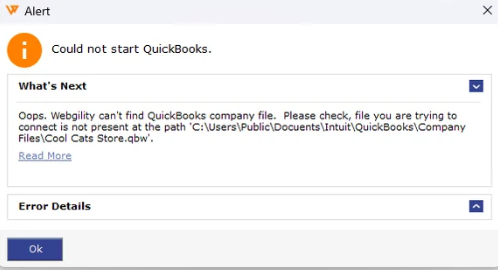
2. Identify Webgility Desktop Version Issues
- Go to Help > Check for updates in Webgility Desktop.
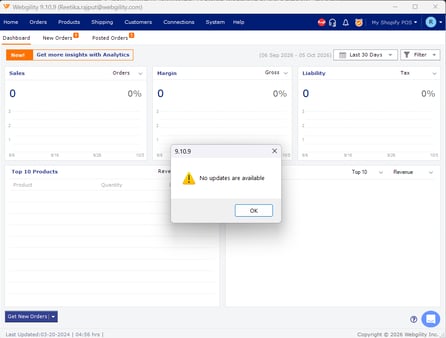
- If outdated, download the latest version.
3. Re-Establish QuickBooks Connection
- Launch the updated Webgility Desktop.
- Go to Connections> Accounting/POS/ERP> click on test QuickBooks connection
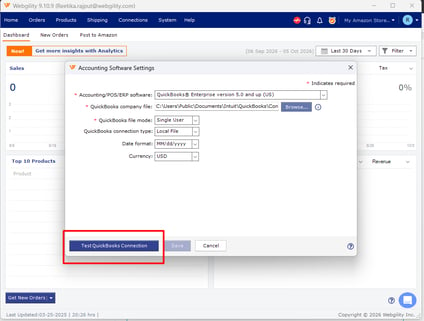
- Follow prompts to reauthorize and test the integration.
- If necessary, refer to how to test QuickBooks Connection in Webgility Desktop.
4. Check Data Availability
- Only the orders and settings available up to the date of the last backup (e.g., 04/11/2023) will be available.
- Any orders placed after this date cannot be automatically recovered unless another backup exists.
Preventive Recommendations
- Schedule regular automated SQL database backups.
- Keep all applications and plugins updated before performing major Windows updates.