
Overview
If Shopify orders fail to post with a QuickBooks error about negative rates on inventory items, Webgility is sending the discount line to an item that QuickBooks treats as inventory. Removing the active mapping stops the discount from being routed to that inventory item on the next post.
When This Applies
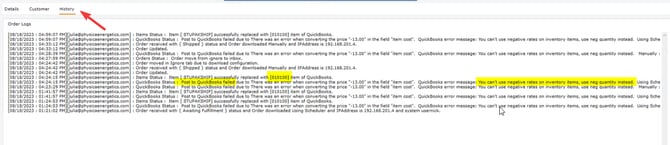
Follow this when a Shopify order with a discount code fails to post to QuickBooks with the message "Post to QuickBooks failed due to: There was an error when converting the price in the field item cost. QuickBooks error message: You can't use negative rates on inventory items; use neg quantity instead." and orders without a discount post normally.
Why This Happens
QuickBooks does not accept a negative rate on an inventory item. When Webgility has the Shopify discount mapped to a QuickBooks inventory item instead of a non-inventory discount item, the negative amount from the discount line is sent to the wrong item type and QuickBooks rejects the whole order.
Important Note: "Removing the mapping stops the collision on the next post attempt; the ongoing fix is to map the Shopify discount to a QuickBooks non-inventory Discount item instead of leaving it unmapped indefinitely."
Steps to Clear the Discount Mapping
-
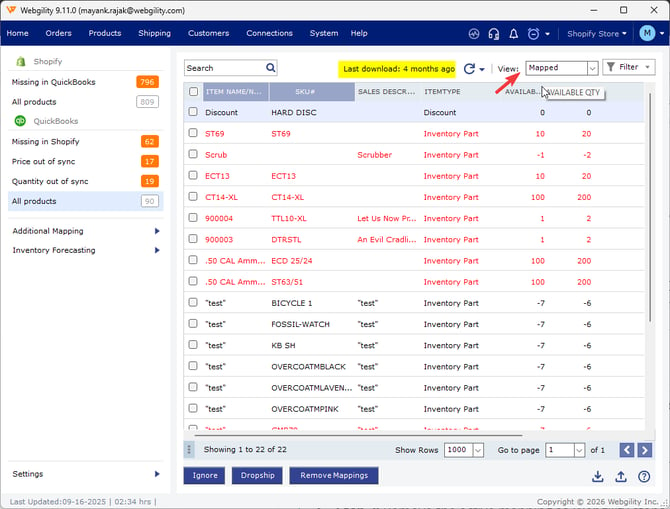
Step 1: Open Webgility Desktop and go to the Products >> All products Quickbooks, select the mapped filter. (refresh the product list if it's not updated recently)
-
Step 2: Search the SKU# in the searchbar, find the active mapping for your Shopify discount item in the mapped-items list.
-
Step 3: Remove the active mapping so Webgility stops routing the discount line to the previous QuickBooks item.
- You may also refer to How to Unmap and Re-Map Inventory Items Correctly in Webgility Desktop.
-
Step 4: Once the Discount Item is mapped, retry posted the same order in the Error Tab.
Key Recommendation
Create a dedicated non-inventory Discount item in QuickBooks and map the Shopify discount line to that item once the orders are posting again.
Feel free to reach out to us at support@webgility.com.