
Symptom
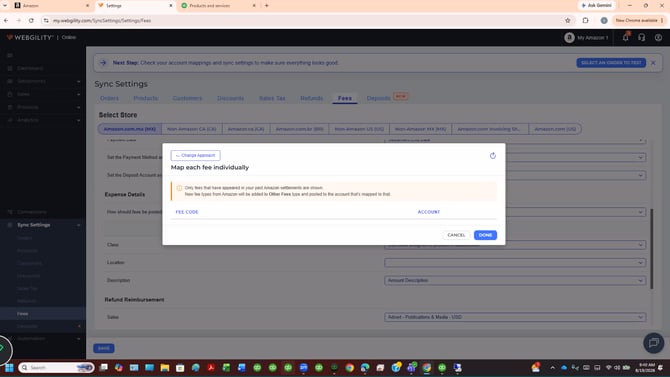
You've just connected an Amazon store in Webgility Online. When you go to Sync Settings > Fees and open Map each fee individually, the dropdown is empty.
Root Cause
This is expected for a new Amazon connection. It isn't a bug or a missing permission.
The fee mapping screen only lists fee codes that have appeared in Amazon settlement reports already downloaded to your profile. The banner on the screen says so: "Only fees that have appeared in your past Amazon settlements are shown."
A newly connected store hasn't downloaded its first settlement report yet, so there are no fee codes to show.
Resolution
Your account is set up correctly, and nothing is wrong with your configuration. Your fee options will appear once a settlement report downloads into Webgility. You have two options:
- Wait for the automatic download. Amazon usually posts new settlements every couple of weeks. After the first report downloads, your fee codes appear in the dropdown.
- Trigger a manual download. If you don't want to wait, start a settlement report download from the Settlements page.
After the report downloads, go back to Sync Settings > Fees and open Map each fee individually to map your fees.
If you sell on more than one Amazon marketplace, each marketplace's fees appear after its own first settlement report downloads.