
Overview
When a marketplace like Amazon collects and remits sales tax directly to the state as a marketplace facilitator, you do not owe that tax and do not need to track it in QuickBooks. Switching Webgility Online's sales-tax recording to Do not record sales tax for that sales channel keeps the facilitator tax out of your books.
How It Works
The Sync Settings > Sales Tax page lets you pick an Amazon store from the Select Store tabs and set its own sales-tax behavior. When Does your online Sales Channel collect Sales Tax? is off, Webgility leaves the tax amount off the posted transaction for that store, so no sales tax liability line is written to QuickBooks for orders from that marketplace.
Steps to Turn Off Sales Tax for an Amazon Store
Step 1: In Webgility Online, open Sync Settings > Sales Tax from the left sidebar (see Amazon Sales Tax Posting in Webgility Online for the broader context on how Amazon tax lands in QuickBooks).
Step 2: Under Select Store, click the tab for the Amazon marketplace you want to update (for example, Amazon.com (US), Amazon.com.mx (MX), or Amazon.ca (CA)).
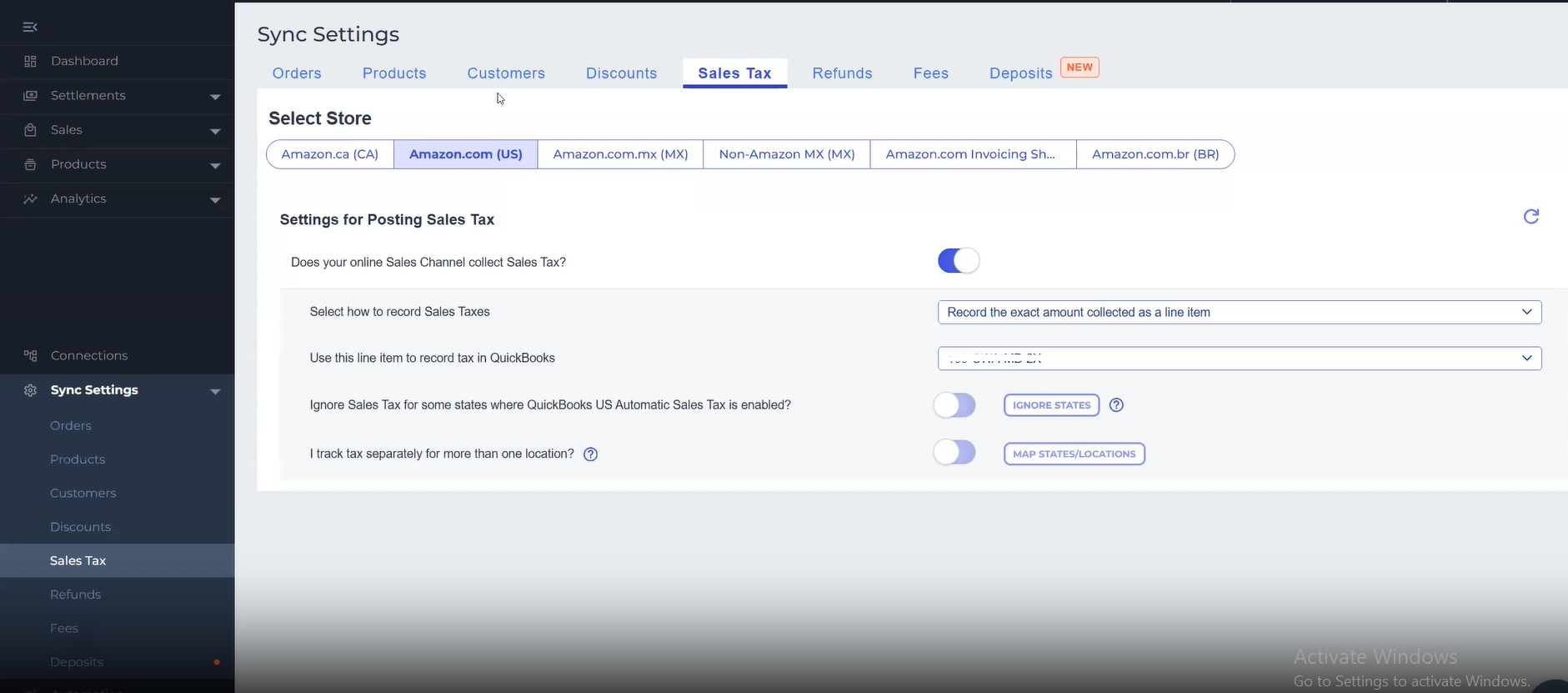
Step 3: Under Settings for Posting Sales Tax, click Does your online Sales Channel collect Sales Tax? so the toggle moves from on (blue) to off (gray), and save.
Step 4: Post a recent Amazon order to QuickBooks and confirm the transaction records with no sales tax line and no tax liability entry (the matching fee and clearing-account setup is covered in Set Up Amazon Fee and Clearing Accounts in Webgility Online).
Important Note"If you split your Amazon fee posting across multiple expense accounts and still see marketplace facilitator tax land in QuickBooks after turning this toggle off, switch your Amazon fee posting to Use one account for all fees from the Configure Expense button on the fee setup screen. That is the current customer-serve workaround while this combined-settings interaction is reviewed."
Key RecommendationMake this change one Amazon marketplace tab at a time and only for stores where Amazon acts as the facilitator. If you also sell through your own storefront on the same QuickBooks file, keep the toggle on for that storefront so your own direct-to-consumer tax liability still records.
Additional SupportIf an older posted settlement already shows marketplace facilitator tax lines in QuickBooks after you update this setting, contact support@webgility.com with the settlement report ID and the Amazon marketplace so the team can review whether unpost-and-repost is appropriate for your file.