
Overview
Webgility Desktop can sync inventory to Amazon using either the Available Quantity or the On-Hand Quantity value from QuickBooks (see Troubleshoot Available Sales Channel Quantity Does Not Match QuickBooks for the difference between the two). If Amazon shows more units than you physically have on hand, Webgility is most likely syncing Available Quantity.
When This Applies
Your Amazon listings show a higher quantity than you physically have in the warehouse, you are overselling items, or the On-Hand Quantity in QuickBooks is lower than what Webgility is pushing to Amazon.
What You'll Need
Admin access to Webgility Desktop on the computer where it is installed, and the latest QuickBooks product data downloaded (see How to Sync Products with Webgility Desktop).
Steps to Switch Amazon Inventory to On-Hand QuantityStep 1: Open Webgility Desktop
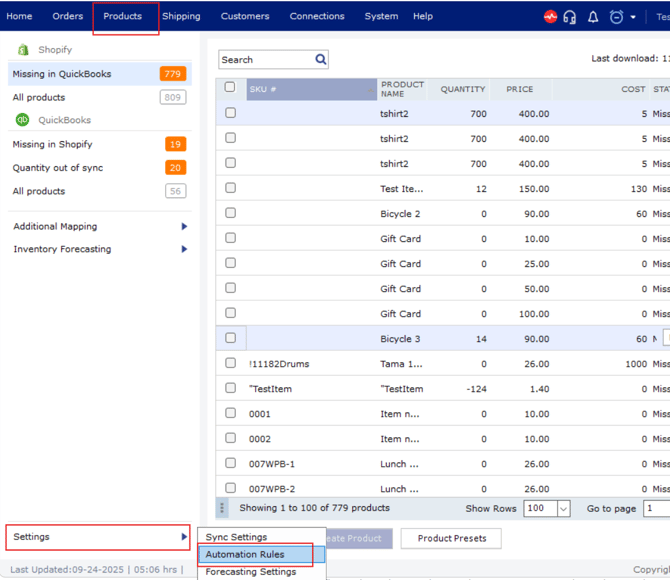
Step 2: Navigate to the Products tab.
Step 3: Go to the Automation Rules under Settings, change the selection from Available Quantity to On-Hand Quantity.
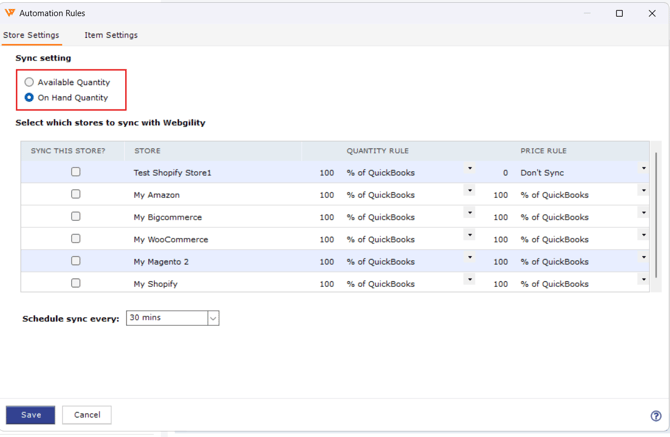
Step 4: Click Save and then click Refresh to download the latest quantities from QuickBooks.
Step 5: Run a manual product sync for your Amazon channel so the updated quantity pushes to the listing.
Key Recommendation
This is a global setting that applies to every item Webgility syncs; you do not need to change it per product. Review your sales channels after the switch so quantities everywhere reflect the physical warehouse count rather than what QuickBooks shows as available.
Additional Support
If the Amazon listing still shows the old quantity after a manual sync, contact Support with your Webgility log file and the SKU where the mismatch is still showing.
Note: Webgility can only sync the FBM(Fullfilled By Merchant) product quantti on Amazon. FBA (Fullfilled By Amazon) is controlled by AMazon and Webgility don't have any controll over it.
If you require any further assistance, please feel free to contact Webgility Support.