
eBay orders stop downloading into Webgility Desktop when the stored eBay connection goes stale, and the download attempt returns No more Orders found even though the orders are visible in your eBay seller account. Reconnecting the eBay sales channel in Webgility Desktop refreshes the connection and pulls the missing orders into the New Orders tab.
When This AppliesUse this fix when every recent eBay order is present in eBay but missing from Webgility Desktop, a manual sync shows No more Orders found, and your last successful eBay download is more than a day old. If multiple sales channels have stopped at the same time, repeat the reconnect for each channel.
Why This HappensWebgility Desktop talks to eBay through an authenticated connection that eBay refreshes on a schedule. When that token lapses, Webgility can no longer see new orders and the API responds with an empty result, which Webgility surfaces as No more Orders found. Reconnecting the channel renews the authentication and the pending orders flow in on the next download.
Steps to Reconnect Your eBay ChannelStep 1: In Webgility Desktop, open Connections > Sales Channels and click Manage Sales Channels.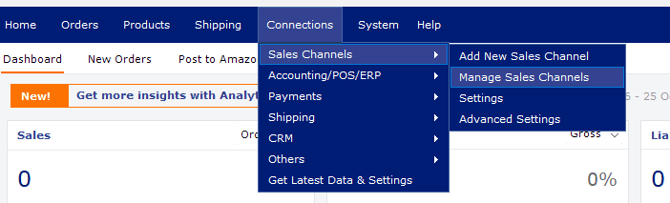
Step 2: Find your eBay store in the list and click the Action pencil to open Edit Connection.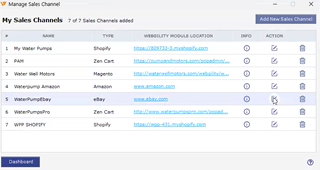
Step 3: On the Sales Channel Settings screen click Connect to eBay, sign in to your eBay seller account in the window that opens, and approve the Webgility connection.
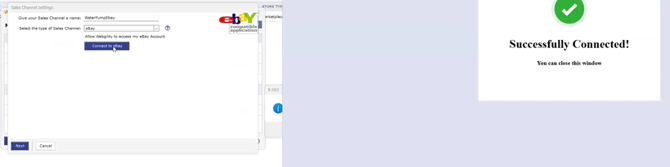
Step 4: Return to Webgility Desktop and click Get New Orders for the eBay channel; the missing orders download into the New Orders tab.
Important NoteIf other sales channels also stopped downloading on the same day, repeat the same reconnect for each one from the Manage Sales Channels screen. The reconnect does not change your download date range or scheduler settings, so your existing automation keeps running once the connection is renewed.
Key RecommendationMake the reconnect your first action whenever a single sales channel shows no new orders for a day or longer; a quick reconnect clears the vast majority of expired-connection cases without needing further troubleshooting or a database backup.
Additional SupportIf the reconnect finishes but orders still do not appear after Get Latest Data, contact Webgility Support with the subscriber ID, the eBay order numbers you expect to see, and the date your last successful download ran so the team can inspect your download settings.