
Overview
If Shopify orders with discounts come into Webgility Desktop at the regular item price instead of the discounted amount, the Get Discounted Item Price setting on the Shopify channel is turned off. Turning it on sends the actual price the shopper paid through to QuickBooks on the next post.
When This Applies
Follow this when your Shopify orders carry a discount code, promotion, or zero-dollar price, and Webgility Desktop still posts those orders to QuickBooks at the item's regular price instead of the discounted total.
How It Works
Webgility Desktop can pull either the base item price from your Shopify catalog or the final discounted price from each order line. When Get Discounted Item Price is off, Webgility uses the catalog price and ignores the per-order discount; when it is on, Webgility reads the discounted price from the order itself so the QuickBooks invoice matches the shopper's receipt.
-
Important Note: "This setting is per sales channel, so turning it on for Shopify does not change the behavior of your Amazon or Walmart channels and does not change past posted orders."
Steps to Enable Discounted Item Price for Shopify
-
Step 1: Click the sales channel selector in the top-right corner of Webgility Desktop and switch to your Shopify store.
-
Step 2: Go to Connections > Sales Channels > Settings.
-
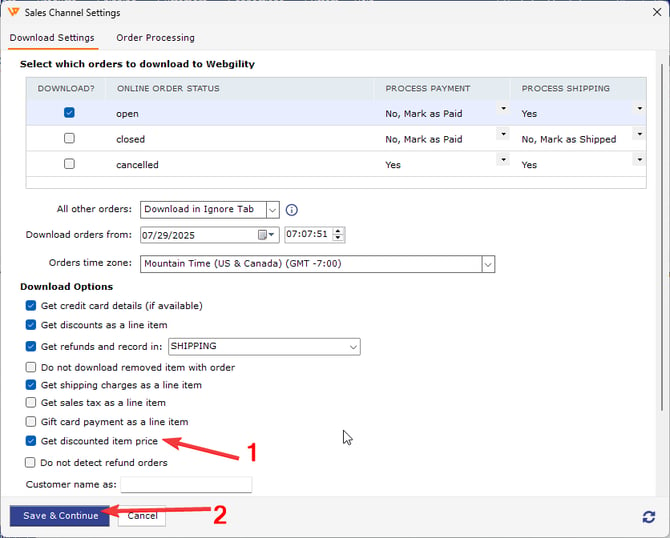
Step 3: Enable the Get Discounted Item Price setting on the Shopify Store Settings page and save your changes.
-
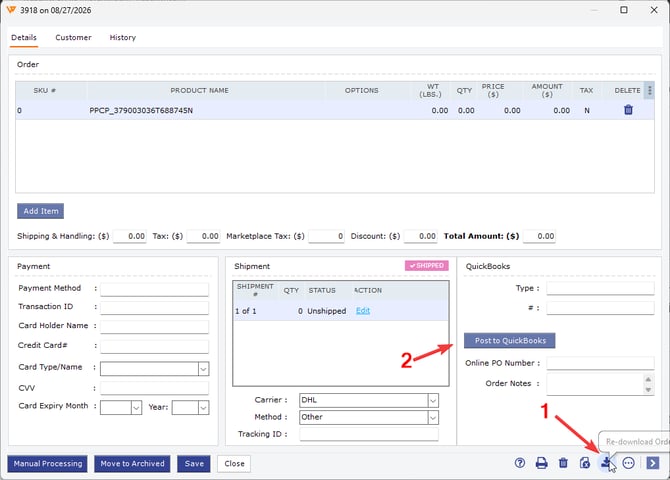
Step 4: Unsync one Shopify order that carries a discount, re-download & click on Post to QuickBooks, and open the resulting QuickBooks invoice to confirm the line items reflect the discounted price.
Key Recommendation
Enable Get Discounted Item Price on every sales channel that passes a per-order discount through to Webgility, not just Shopify. Mixed configurations across channels lead to one channel's orders matching the shopper's receipt in QuickBooks and another channel's orders overcharging the item line, which is harder to catch during reconciliation than if the behavior is the same everywhere.
Feel free to reach out to support@webgility.com.