
Why use payment status automation?
Some sales channels allow customers to authorize a payment when placing an order and capture the actual payment later.
Previously, Webgility Online automation could trigger order posting based on fulfillment status only. As a result, orders awaiting payment capture often required manual monitoring and posting.
With payment status-based automation, you can:
- Automatically post orders when payment is received.
- Reduce the need to manually monitor authorized orders.
- Avoid delays in recording paid orders in your accounting system.
- Manage your order posting workflow more efficiently.
How to enable payment status-based automation
Follow these steps to configure your automation settings:
- Log in to Webgility Online.
- Navigate to Automation Settings.
- Locate the Filter Orders By section.
- Select Payment Status.
- Choose the payment status you want to use as the trigger for automatic posting, such as Paid.
- Save your settings.
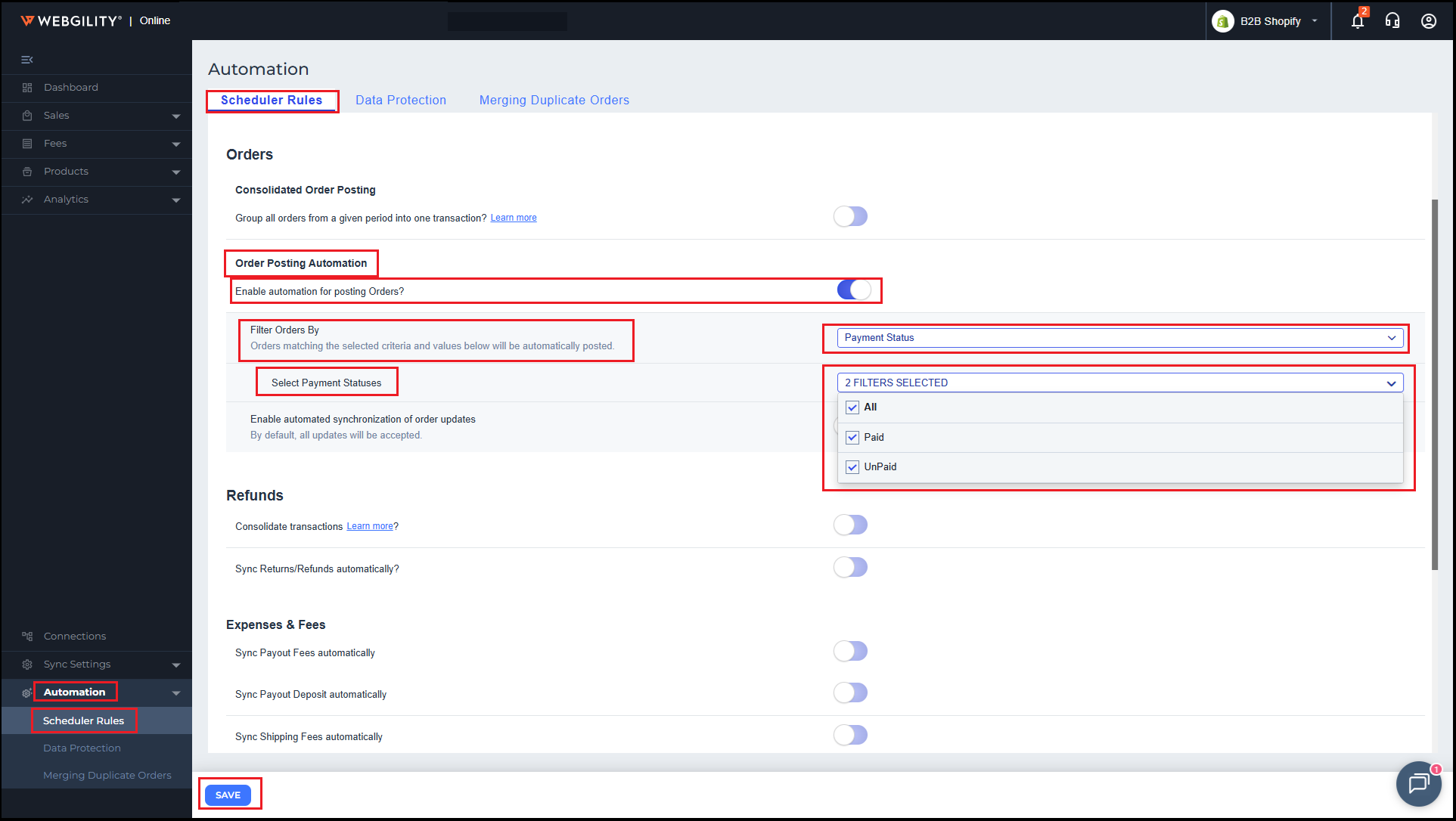
Once configured, Webgility Online will use your selected payment status to determine when eligible orders should be automatically posted to your accounting system.
Example: Automatically post orders when payment is captured
Let's say a customer places an order for $250 and authorizes the payment at checkout. However, the actual payment is captured only after the order is ready for processing.
Here is how the automation works:
| Order stage | Payment status | Automation action |
|---|---|---|
| Customer places an order | Authorized | Order waits for the selected payment status |
| Payment is captured | Paid | Webgility Online triggers automatic posting |
| Order is posted | Paid | Order is recorded in your accounting system |
This means you no longer need to manually locate and post these orders after their payment has been captured.
Supported sales channels
Payment status-based order automation is currently available for:
- Shopify
- Lightspeed X
Support for additional sales channels, including BigCommerce, eBay, and Magento 2, is planned for future releases.
Frequently Asked Questions
1. Can I automate order posting based on fulfillment status as well?
Yes. You can continue using fulfillment status-based automation. Payment status provides an additional filtering option for determining when orders should be posted.
2. Do I need to manually post an order after its payment status changes to Paid?
No. If payment status-based automation is configured and the order meets your selected criteria, Webgility Online will automatically trigger the posting process.
3. Can I use this feature for orders that are initially authorized and paid later?
Yes. You can select Paid as the trigger status so that eligible orders are automatically posted when their payment is captured.