
Overview
If you sell on Amazon US and Amazon Canada using a single Amazon Seller profile, you can configure Webgility Desktop to map orders to separate Standard Customers based on their transaction currency.
This setup requires Multi-Currency to be enabled in QuickBooks Desktop Enterprise and Amazon orders to contain the correct currencies.
Important: This configuration works only when Amazon orders are downloaded in their respective currencies (USD for the US and CAD for Canada). If all orders download in the same currency, this setup will not work as intended.
Steps to Configure Customer Mapping1. Enable Multi-Currency in QuickBooks Desktop Enterprise
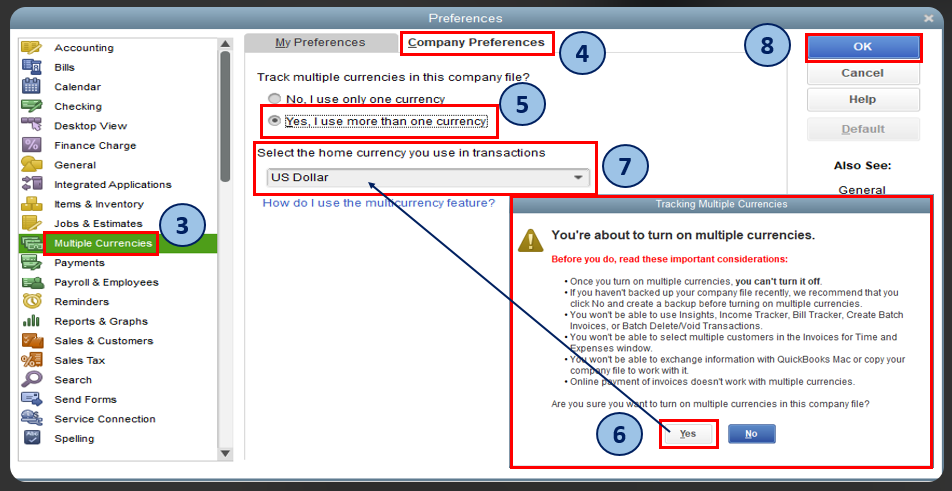
- Open QuickBooks Desktop and go to Edit > Preferences.
- Select Multiple Currencies.
- Open the Company Preferences tab and select Yes, I use more than one currency.
- Select your home currency and click OK.
2. Configure Currency Mapping in Webgility Desktop
- Go to Connections > Accounting > Sync Settings > Customers > Multiple Currency Settings.
- Enable Map customer currency.
- Click Setup Currency and map each currency to the corresponding QuickBooks currency, A/R account, and deposit account.
- Save the currency settings.
For detailed instructions, refer to Multiple Currency Settings in Webgility Desktop.
3. Map Standard Customers by Currency
- Under Multiple Currency Settings, select Setup Standard Customer.
- Assign the USD currency to your Amazon US Standard Customer.
- Assign the CAD currency to your Amazon Canada Standard Customer.
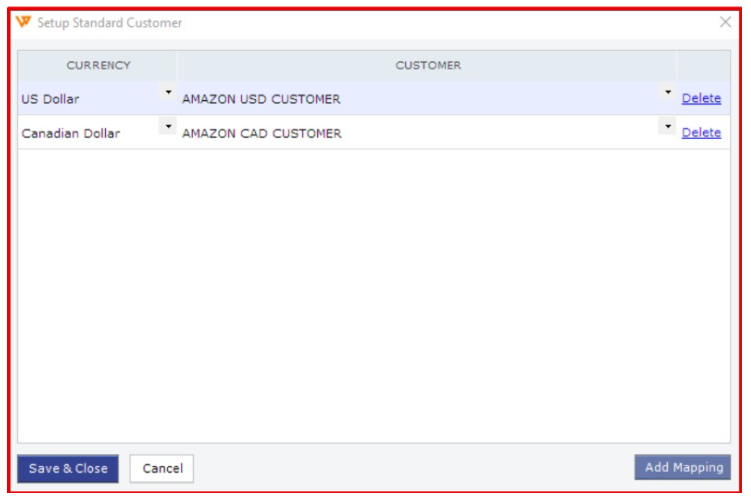
- Verify that each QuickBooks customer is configured with the matching currency, then save the settings.
Expected Result
Webgility Desktop will assign Amazon US orders in USD to the US Standard Customer and Amazon Canada orders in CAD to the Canada Standard Customer.
If you have any questions or need more help, please contact our support team.