
Overview
With Webgility, you have two sets of login credentials that you may use regularly. Understanding the difference between them is important to ensure smooth access to your Webgility Portal Account and Webgility Online Application.
Types of Login Credentials
- My Account/Portal login credentials (where you manage your account details, billing, etc.)
- Webgility Online login credentials
Note: Your administrator password and product password can be different from one another. Changing one will not change the other.
How to access Portal Account
- You can visit https://portal.webgility.com/
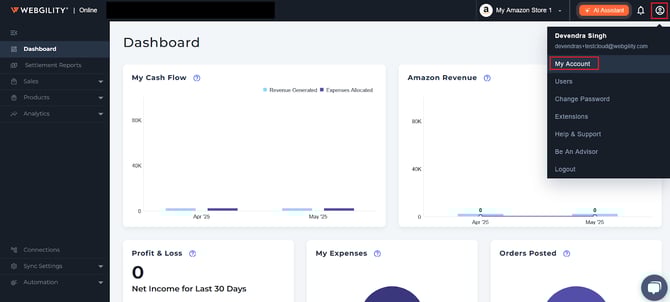
- You can also access the same directly, from Webgility Online application. You can access portal by navigating to the profile icon (top right corner), then click on My Account.
How to Change Your Portal Login Credentials
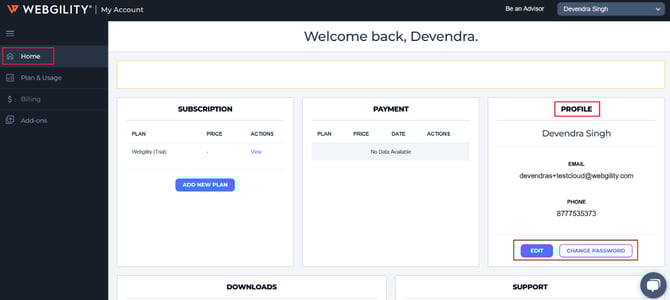
Once you are signed into your Webgility Portal Account then under Home section navigate to Profile and click on Edit / Change Password in order to update new Email Address OR password, respectively.
Change Webgility Product Login (Email or Password)
Once you are signed into your Webgility Portal Account then navigate to Add-on section and under “Users” click on Edit / Change Password in order to update their new login email address OR password, respectively.
