
Overview
Webgility Desktop users can access the End-User License Agreement (EULA) directly from the application. The EULA contains the terms and conditions governing the use of Webgility software products.
This article explains how to locate and open the EULA from within Webgility Desktop.
Steps to Access the End-User License Agreement
Step 1: Open Webgility Desktop
- Launch the Webgility Desktop application on your computer.
- Log in to your Webgility account if prompted.
- Once the application opens, locate the main navigation menu at the top of the screen.
Step 2: Navigate to the Help Menu
- Click Help in the top navigation bar.
- From the dropdown menu, select Terms and Privacy.
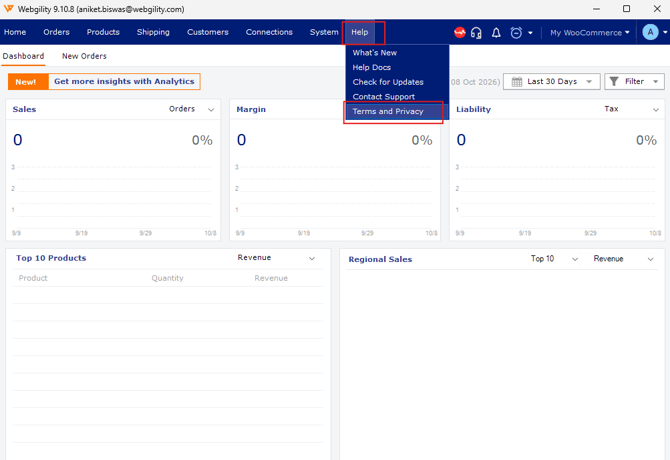
Step 3: Open the End-User License Agreement
- After selecting Terms and Privacy, locate the About Webgility window.
- Click the End-User License Agreement link in the upper-right corner of the window.
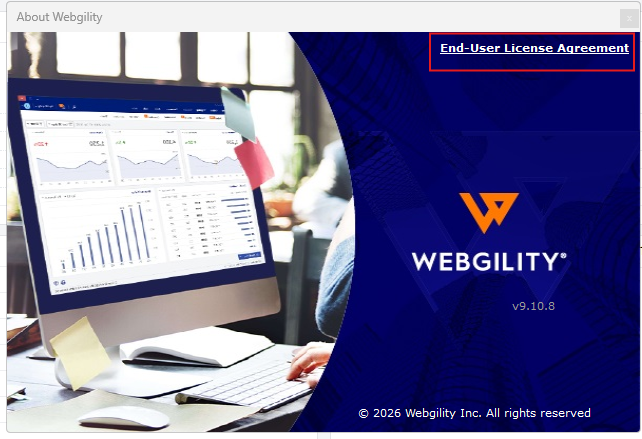
- The Software License Agreement PDF will open in your default PDF viewer or web browser.
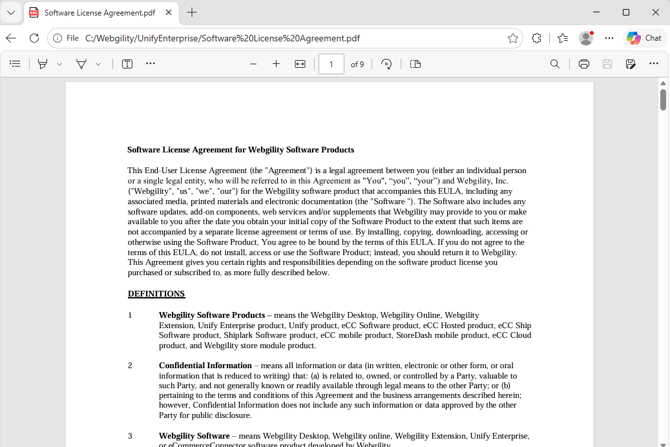
Step 4: Review the Agreement
Once the PDF opens, you can review the Software License Agreement for Webgility Software Products.
The document may be viewed directly in your browser or PDF viewer. You can also use the viewer's available options to navigate through the pages, print the document, or save a copy if needed.
Troubleshooting
If you are unable to access the EULA, try the following:
- Ensure Webgility Desktop is open and functioning correctly.
- Verify that you selected Help → Terms and Privacy.
- If the PDF does not open automatically, check whether your browser or PDF viewer is open in the background.
- If the agreement still does not open, contact Webgility Support for further assistance.
If you require any further assistance, please feel free to contact Webgility Support.