
If Walmart orders have stopped appearing in Webgility Desktop and you are keying them into QuickBooks by hand, the per-channel download filter is almost certainly skipping them. Turning on the Created order status for your Walmart channel brings those orders back into the queue.
When This AppliesFollow this when your Walmart channel is connected, your Shopify and Amazon channels are still downloading orders normally, and new Walmart orders show in your Walmart Seller Center but never land in Webgility Desktop. No error dialog appears — the orders are quietly filtered out by the channel's download rules.
Why This HappensWebgility Desktop only pulls the order statuses you have ticked on each channel. Walmart's new orders arrive with the Created status, so if that checkbox is off on your Walmart channel settings, every new order is excluded before it reaches your queue.
Important Note: "The Created order status checkbox is set per sales channel, so turning it on for Walmart does not change the behavior of your Amazon or Shopify channels."
Steps to Enable Walmart Order Download
Step 1: Click the sales channel selector in the top-right corner of Webgility Desktop and switch to your Walmart store.
Step 2: Go to Connections > Sales Channels > Settings.
Step 3: Open the Download Orders section and tick the Created order status checkbox.
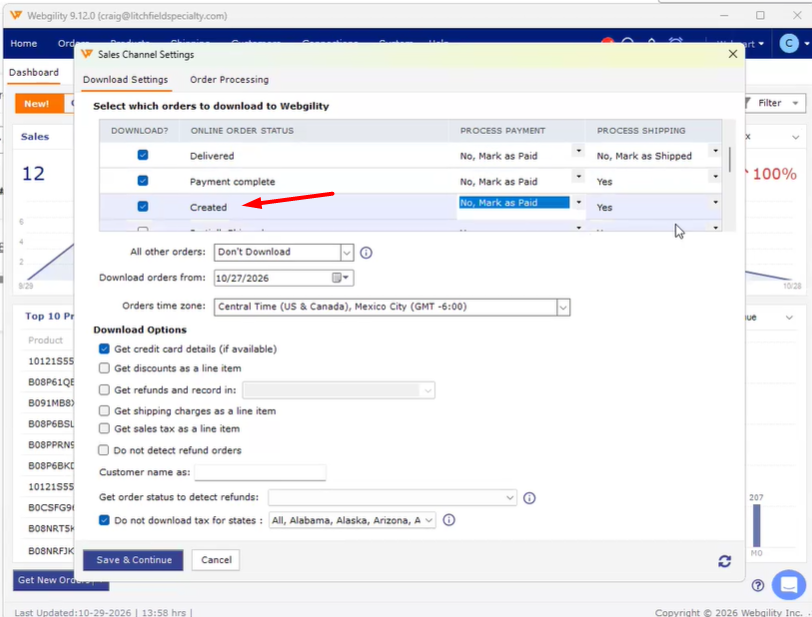
Step 4: Click Save, then run a manual download on the Walmart channel to confirm the new orders land in your Webgility Desktop queue and post into QuickBooks.
Key RecommendationReview the download status filters on every sales channel you have connected after a Webgility update or a Walmart marketplace change. Marketplaces occasionally rename or add order statuses, and a missing checkbox is the most common reason a connected channel suddenly looks silent.
Additional SupportIf your Walmart orders still do not download after enabling the Created status, email support@webgility.com with your Walmart store name, a sample order ID from Walmart Seller Center that is missing in Webgility, and a screenshot of your Walmart channel's Download Orders section so the team can verify the filter configuration.