
You are seeing one FedEx rate when you pick the service (and on the printed label's doc tab), but a higher amount shows up in the Shipping Charges field inside Webgility Desktop once the label is created. Switching the FedEx rate request type from LIST to ACCOUNT brings the recorded figure back in line with what FedEx actually bills you.
When This AppliesThis applies to Webgility Desktop users shipping with FedEx whose account has negotiated or discounted rates, where the figure Webgility records after creating the label is consistently higher than the service rate you chose at the time of shipping.
Why This HappensFedEx can return two rate numbers for the same shipment: LIST (FedEx standard published rate) and ACCOUNT (the discounted rate tied to your FedEx account). When Webgility Desktop is set to request the LIST rate, it records the standard figure as Shipping Charges even though the label itself prints and bills at your account rate, which is why the two numbers do not agree.
Important Note: "This setting only affects the amount Webgility records against the order. It does not change what FedEx charges your account — the label itself is already billed at your ACCOUNT rate."
Steps to Switch the FedEx Rate Request Type to ACCOUNT
Step 1: Open Webgility Desktop and go to Shipping > Shipping Settings from the top menu (full walk-through of the Shipping Settings screen is in How to configure shipping presets in Webgility Desktop).
Step 2: Under Shipping Rules tab > Default settings for Each processor Click Configure next to FedEx.
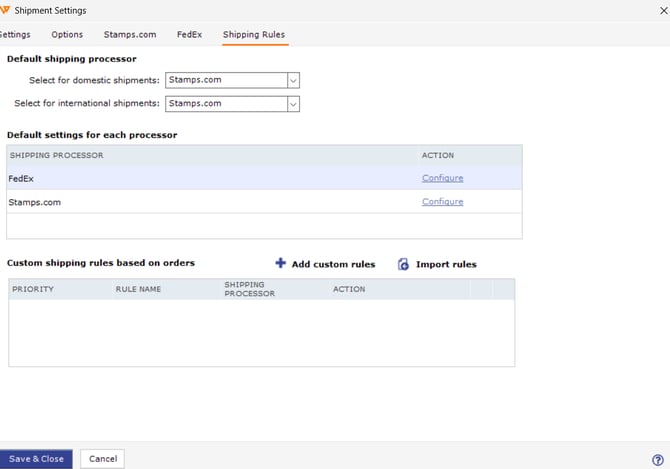
Step 3: Find the Rate request type field and change it from LIST to ACCOUNT.
Step 4: Click Save, close the dialog, and create a test label on a sample order to confirm the Shipping Charges field now matches your discounted rate.
Key RecommendationPick a single low-value test order before your next batch run so you can compare the rate shown at service selection, the amount printed on the doc tab, and the figure Webgility records against the order — once all three match, the rest of the day's labels will record correctly.
Additional SupportIf the Shipping Charges field still shows a higher figure after switching to ACCOUNT, contact support@webgility.com with the order number, the service selected, the rate on the doc tab, and a screenshot of the Shipping Settings > Configure Default Settings > FedEx > Additional Settings dialog.