
Error Message:
Order no. is in ignored status
Cause of the issue:
This issue typically occurs when trying to post Amazon Settlement Report. This error indicates that order (mentioned in the error message) associated with the settlement has been moved to the Ignored tab in Webgility Desktop. Since ignored orders are not included in settlements, the system prevents posting the Settlement Report.
Steps to fix:
Locate the Order:
-
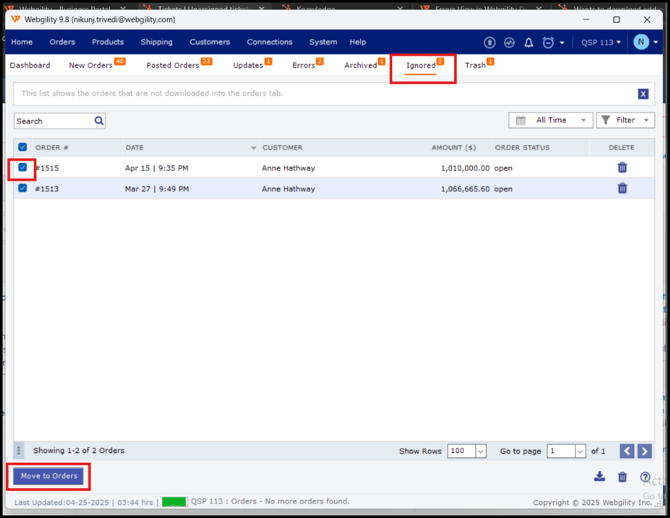
On Dashboard view navigate to the Ingored tab.
-
Search for the order mentioned in the error message.
Move the Order to the New Orders Tab:
- Select the order and click on “Move to Orders”
Reattempt Settlement Posting:
-
Once the order is moved, navigate back to Orders in the menu options, then go to Amazon and click on Settlement Report.
-
Now try to post the report again.