
Overview:
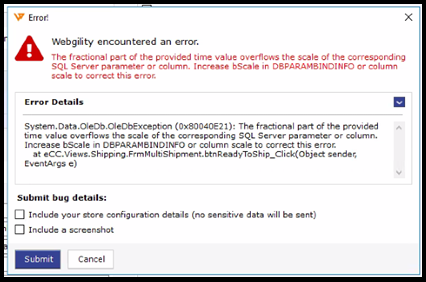
This error message typically occurs when processing a shipment using FedEx through an application that uses an SQL Server database to sales channels and manages data related to the shipment. The error message suggests that there is an issue with an SQL Server parameter or column related to the time value provided by the application.
FedEx provides a web service API that allows developers to integrate shipping functionality into their applications. When processing a shipment using FedEx, the application needs to provide various data points such as shipment details, delivery address, and shipment time. The error message indicates that there is an issue with the time value provided by the application.
To resolve this error, you need to identify the specific SQL Server parameter or column that is causing the issue and increase its scale to accommodate the fractional part of the time value being provided by the application. Alternatively, you can truncate the fractional part of the time value before inserting it into the SQL Server parameter or column.
In some cases, the issue may be related to a limitation in the FedEx web service API itself. In such cases, you may need to contact FedEx support for assistance in resolving the issue.
Error Message
Troubleshooting
To fix this error, follow these steps:
-
In Webgility Desktop, go to the International tab on the shipping form.
-
If "Ship document" is selected instead of "Ship commodities," ensure that the ship date and expiration date are not the same.
-
Choose a different date that is not the same as the ship date.
-
Save the shipping form.
-
Attempt to process the shipment again.