
Skip to content
  • There are no suggestions because the search field is empty.

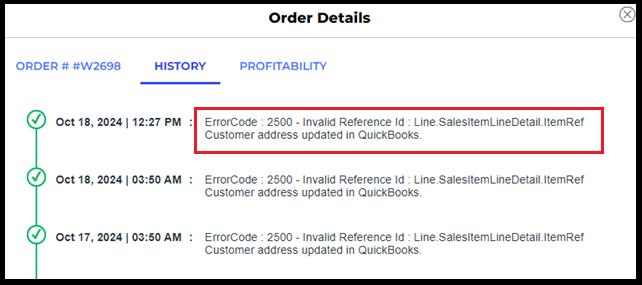
ErrorCode: 2500 - Invalid Reference Id: Line.SalesItemLineDetail.ItemRefCustomer address updated in Quickbooks

This article addresses the ErrorCode: 2500 - Invalid Reference Id: Line.SalesItemLineDetail.ItemRef encountered when posting orders from Webgility Online to QuickBooks Online or QuickBooks Desktop. The error typically arises when customer addresses or product/item details have been modified directly in QuickBooks, causing data mismatches with Webgility Online. The article provides step-by-step instructions to resolve the issue by refreshing and re-syncing customers, items, and settings between Webgility Online and the QuickBooks company file.

Error Message:


Steps to resolve:

Step 1: Navigate to Sync Settings


Step 2: Click on "Orders, " select the refresh button, and click on Save.


Step 3: For "Products

Note : Since the release of Webgility Online v8.40.0, it is capable of automatically downloading all items from QuickBooks Online, so no manual action is required.

Step 4: Click on "Customers" and then select “Download from scratch”, hit the refresh button, and click on Save.


Step 5: Click on "Discounts" and then select the refresh button and click on Save.


Step 6: Click on "Sales Tax" and then select the refresh button and click on Save.


Step 7: Click on “Refunds” and “Fees” and repeat the same.

Step 8: Select the order in error and click on “Post to Quickbooks”